
Rights :
- Administrators: Consultation, creation and modification
To set up a service task
- In the Select Service panel, click Select Service.
- Select “Mail, Internal SMTP” and click OK.
- In the Service Entry Data panel, click Select Data.
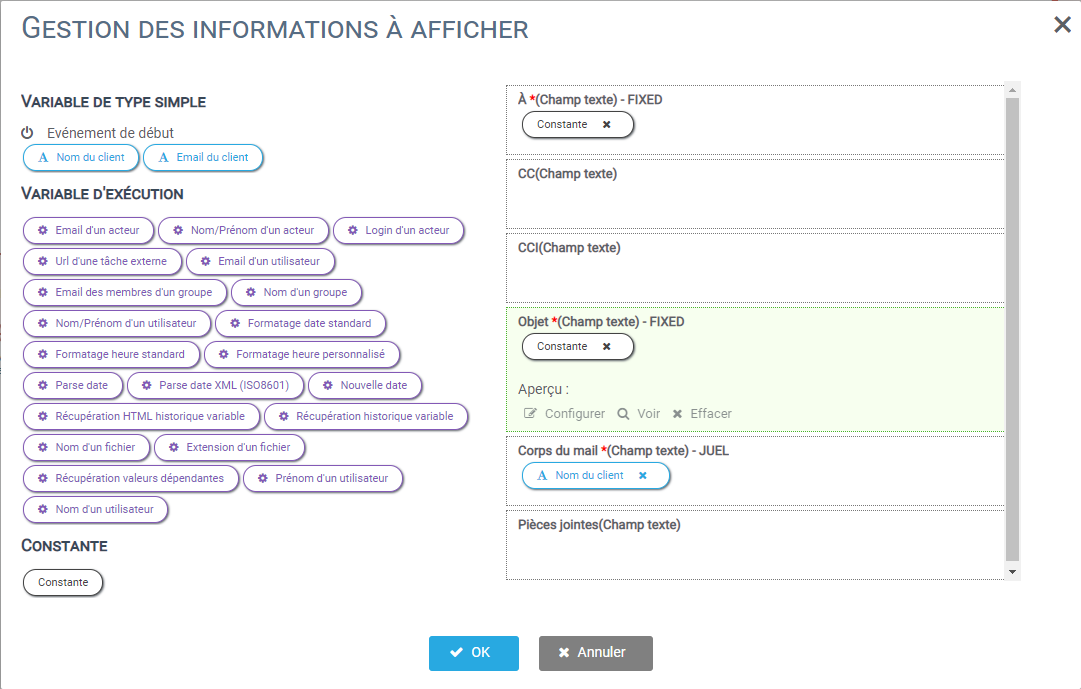
- Configure the mail according to the following table :
| Body of the mail | Data | Configuration (Click on configure) | E-mail format |
| À | – | FIXED | Choose Text field and enter the email address of your Service Department. For the tutorial, insert directly your email to test the reception of the reminder email. |
| Attachments | – | – | – |
| Subject | – | FIXED | Write down “Pending Claim Processing”. |
| CCI | – | – | – |
| CC | – | – | – |
| Body | Nom du client | JUEL | Write on the right side; “Hello, please process the pending customer complaint [cliquez sur la variable “Nom du client” pour l’insérer directement].” |
Here’s what your screen should look like:
Click OK to complete the configuration.


